Features

Complete WordPress Protection. Powered by Collective Intelligence.

Protect your WordPress website against malware, malicious traffic, bots and automated attacks, and keep track of vulnerabilities. Monitor threats and manage backups; with Premium, add virtual patches and the intelligence of the Argus network.

Every feature below exists in the current Argus Defence release. Badges show the edition: Free is in both editions, Premium needs a licence, and Off until enabled is available but you switch it on.

Free is not a trial

Essential protection is never behind a paywall.

Free works on its own: no account, no licence check and no connection to any other service. All of this is included in Free:

  • Findings and scan results, with full history
  • Vulnerability list with the offline baseline
  • Quarantine: view, restore, delete
  • Audit log, Threats, Activity and e-mail alerts
  • Two-factor authentication
  • Form protection against spam and fake sign-ups
  • Firewall, bans and IP management
  • Manual backups, download and restore

Premium adds live intelligence from the Argus network (IP reputation, live firewall rules, a live vulnerability feed and virtual patches), scheduled backups, scan schedules at intervals, and cache warming and minification. See the full comparison.

01 · Stop it before it starts

Prevent attacks

Blocking starts when you switch the firewall from Monitor to Block. Until then, bans, login hardening and form protection record what they would have stopped. On a connected Premium site, virtual patches act on a match even in Monitor.

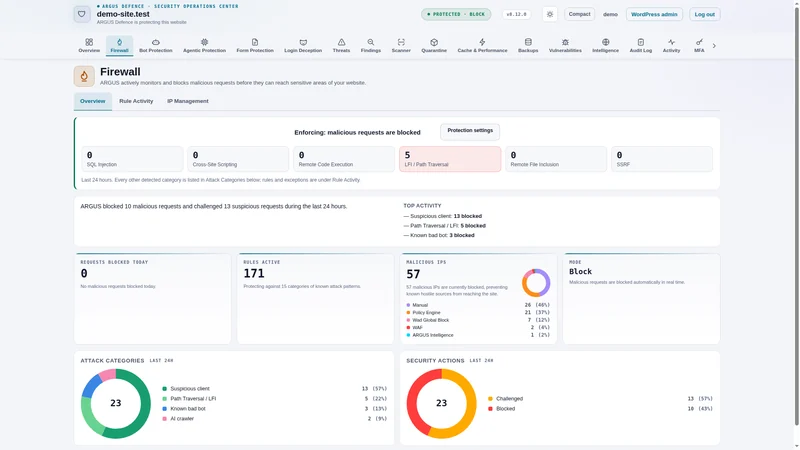
Firewall

Checks every request before WordPress handles it and recognises SQL injection, cross-site scripting, remote code execution, file inclusion and similar attacks. It starts in Monitor mode, so nothing legitimate is blocked until you switch to Block.

Bans and IP lists

Repeat offenders get longer bans automatically. One allow-list and one block-list apply everywhere, and every block shows its reason and source.

Login hardening

Failed logins count toward bans before WordPress checks the password. A custom login address and decoy login pages are available, off until you enable them.

Two-factor authentication

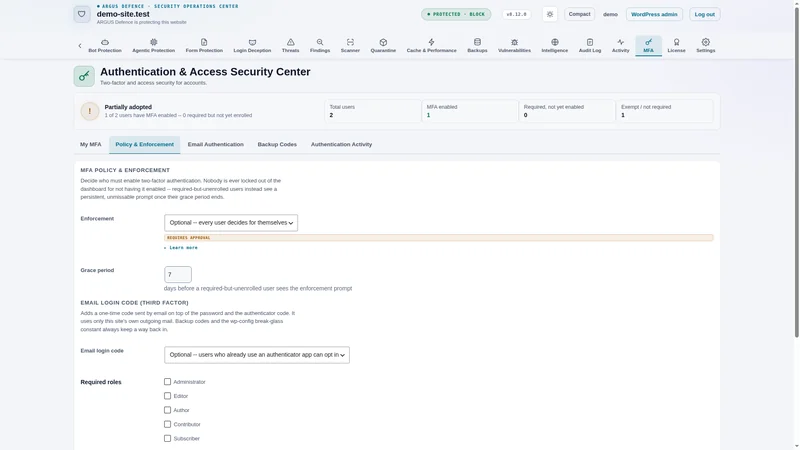
Authenticator-app codes with backup codes, an optional e-mailed third factor, and policies for administrators, chosen roles or everyone, with a grace period.

Form protection and anti-spam

Stops comment, registration and contact-form spam without a CAPTCHA. Works with WordPress comments and registration, Contact Form 7, WPForms and Gravity Forms, plus other forms through a generic layer.

Bot protection

Blocks known bad bots by name. You can also choose to refuse named AI crawlers or challenge scripted clients; search engines and uptime monitors stay allowed.

FreeOff until enabledLearn more about Bot protection

Hardening switches

Browser security headers, protection against username discovery, and controls for XML-RPC and the REST API, in one settings page.

Built in, mostly invisible

Privilege-escalation tripwire

Blocks silent changes to the registration setting, the default role and the security keys, and flags suspicious new administrators and role changes.

Application-password control

An optional switch to turn application passwords off, and an audit trail when one is created, revoked or first used from a new network.

Safe changes, easy undo

Server configuration is written with a snapshot, verified and rolled back automatically if it fails; templates show a preview and can be undone.

Never locks you out

A signed-in administrator is not caught by IP bans, a wp-config Safe Mode switch stops all automatic actions, and WP-CLI commands recover two-factor access.

Cloudflare and proxy aware

Detects Cloudflare and ordinary reverse proxies so the visitor address is read correctly, without trusting headers that anyone could forge.

Starts before other plugins

The firewall loads as a must-use component, so it runs before other plugins do.

Automated threat response

What Argus handles, and what stays your decision

Argus acts on its own where that is safe and asks you where it is not. Actions are recorded with their reason in the audit log.

Automatic

  • Repeat offenders get longer bans (when the firewall is in Block mode)
  • Failed logins are counted and refused before WordPress checks the password
  • PHP files that appear in uploads are quarantined
  • Updates are installed (on by default; you can turn them off)
  • Premium and connected: reputation decisions become labelled local bans you can remove

Needs you

  • Switching from Monitor to Block (new installs start in Monitor)
  • Reviewing quarantined files and findings
  • Updating vulnerable plugins (one click) and restoring backups
  • Approving held registrations
  • Turning on optional features and connecting to the Argus network

02 · Know what is wrong

Detect problems

Malware scanner

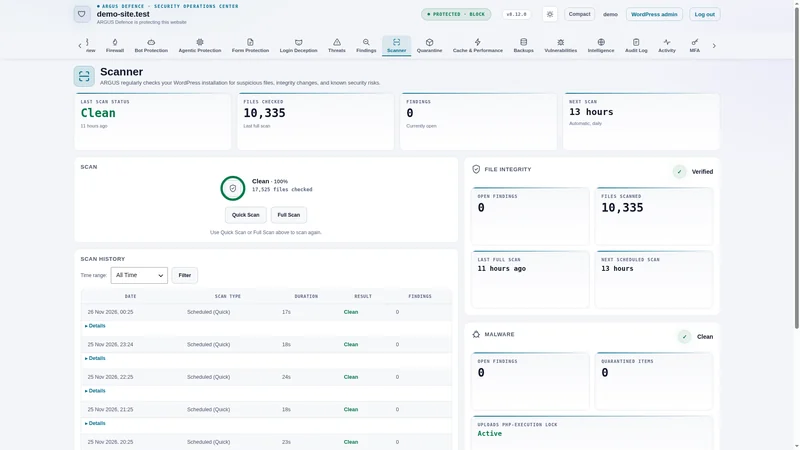
Checks PHP files for web shells and backdoors. A full scan runs automatically every day; Quick and Full scans run on demand. Findings are visible in Free.

Vulnerability scanner

Lists vulnerable plugins, themes and core with the fixed version and a one-click update. A signed offline baseline is free; Premium adds the live feed.

Findings

Every detection becomes a finding with a severity, a plain-language explanation of what happened and why it matters, and actions you can take.

Malware scanner

Find web shells and backdoors before they are used

Looks through the PHP files of WordPress, plugins, themes and uploads for the patterns web shells and backdoors leave behind. A full scan runs automatically every day, and you can start a Quick or Full scan at any time.

  • Free: daily full scan, Quick and Full scans on demand, up to 3 schedules, and all findings and history
  • Premium: scan as often as every hour, up to 10 schedules
  • PHP files only. It reports what it finds and leaves the decision to you; it is not an antivirus.
Argus Defence · Scanner
Scanner with last scan status, files checked, scan history, file integrity and malware status
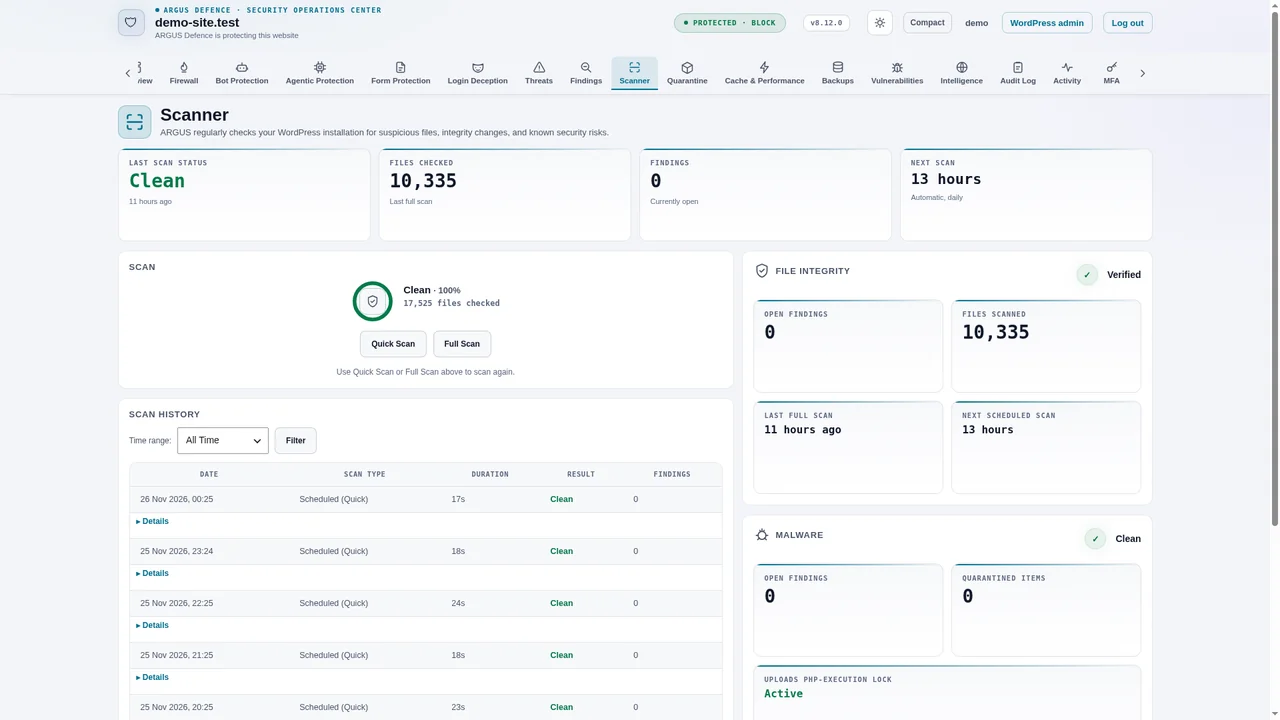
Scanner: status, scan history and file integrity. Real console, demonstration site; identifying data replaced.

Vulnerability scanner and intelligence

See which plugins, themes and core versions are known to be vulnerable

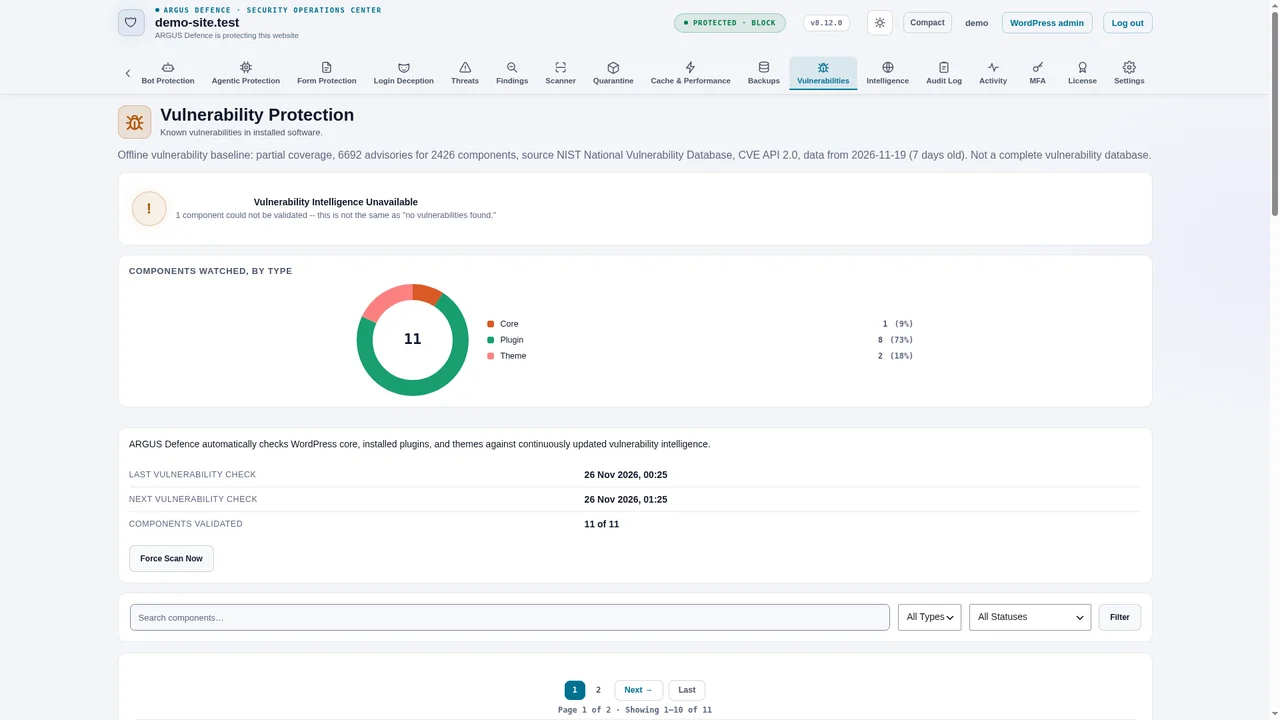
A CVE (Common Vulnerabilities and Exposures) is the public ID number given to a known security flaw in a piece of software. Argus compares what you have installed with what is known, and shows the installed version against the latest version, the severity, a status, the fixed version and a one-click update.

  • Free: a signed offline baseline built from public NVD records. Coverage is partial and it is updated with each Argus release.
  • Premium: a live vulnerability feed from the Argus network (ANIS), merged over the baseline.
  • A component that cannot be checked is labelled Could Not Be Validated, never reported as safe.
Argus Defence · Vulnerabilities
Vulnerabilities screen listing components with version and validation status
Vulnerabilities: components, versions and status. Real console, demonstration site; identifying data replaced.

AI and agentic attack protection

Catch automated attack sessions by what they do

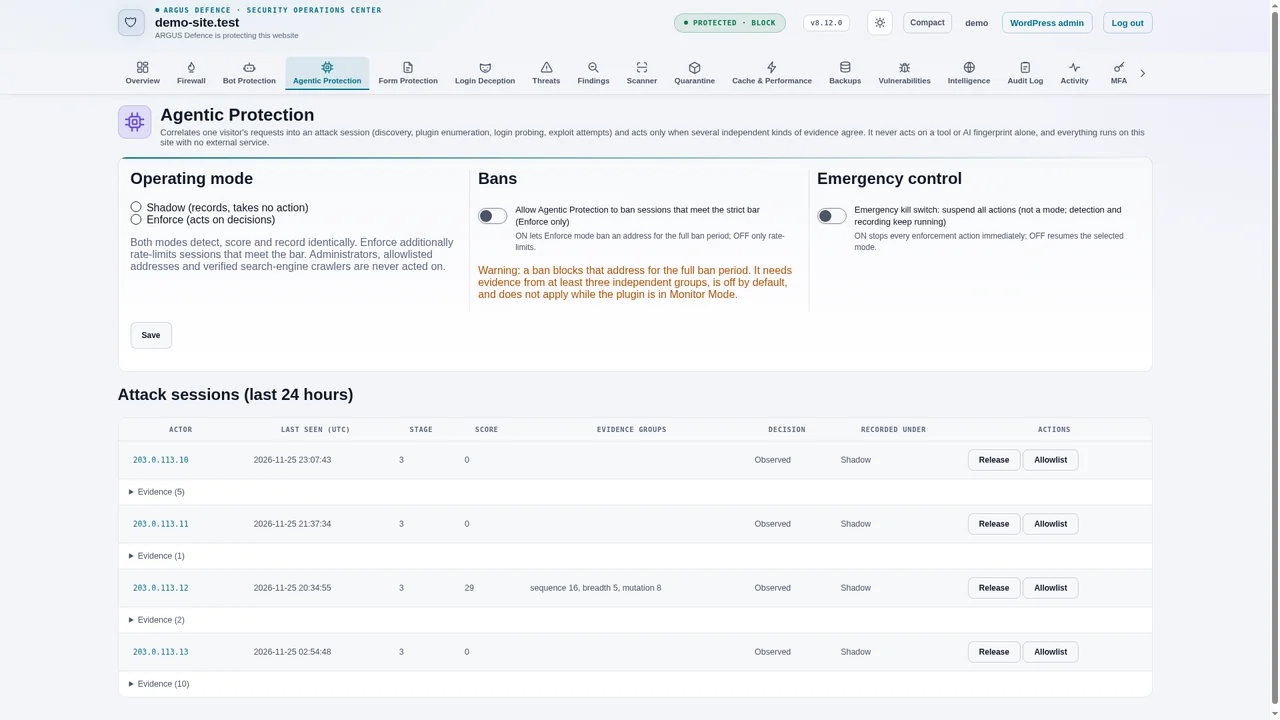
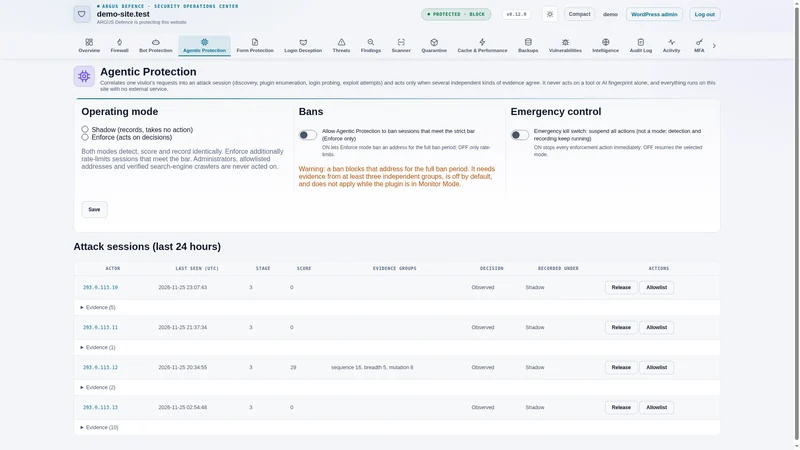
Automated attacks behave like a script exploring your site: find pages, look for plugins, probe the login, try exploits. Agentic Protection follows one visitor across requests, weighs several independent kinds of evidence and acts only when they agree, so one odd request never gets anyone blocked. It judges behaviour across requests, not who or what is behind them.

  • Starts in Shadow mode: it records its decisions and takes no action until you choose Enforce.
  • In Enforce, qualifying sessions are rate-limited; bans need a second switch, and an emergency stop is always available.
  • Administrators, allow-listed addresses and verified search-engine crawlers are never acted on.
  • Optional in Bot Protection: refuse named AI crawlers (off until you enable it).
Argus Defence · Agentic Protection
Agentic Protection with operating mode, bans, emergency control and attack sessions
Agentic Protection: operating mode and attack sessions. Real console, demonstration site; identifying data replaced.

03 · Limit the damage

Contain threats

Upload guard

Refuses uploads with executable file types and stops PHP from running in the uploads folder (Apache and LiteSpeed servers).

Quarantine

PHP files that appear in uploads are isolated automatically. You review each one, then restore it or delete it. Other suspicious files are reported as findings.

Virtual patching

Version-gated blocks for specific known plugin vulnerabilities, delivered by the Argus network once your site is connected. It does not replace updating the plugin.

Live firewall rules

Premium sites that connect to the Argus network can receive signed firewall rule updates without waiting for a plugin release.

CVE virtual patching Premium

Block the exact exploit while you update

Plugin vulnerabilities are normally fixed by an update, but not every site can update the same day. A virtual patch is a rule that blocks the specific request used to exploit a known plugin vulnerability, and only while an affected version is installed. Rules are delivered by the Argus network and verified by signature. Hits appear in Findings and the audit log.

How CVE virtual patching works Top row: a plugin vulnerability becomes public, the Argus network prepares a signed rule, and your Premium site downloads it and checks the signature. Bottom row: an incoming request is checked against the installed plugin version and then against the known exploit; only a match is blocked and recorded as a finding, anything else passes normally. 1 · The rule arrives (Premium, connected site) A plugin vulnerabilitybecomes public (CVE) The Argus networkprepares a signed ruleANIS Your site downloads the ruleand checks its signatureStored on your server rules used by the check 2 · A request arrives at your site An incomingrequest Is the affected plugininstalled at anaffected version? Does the request matchthe known exploit? Blocked (403)and recordedas a finding yesyes nono Passes normally Passes normally How CVE virtual patching works A plugin vulnerability becomes public, the Argus network prepares a signed rule, and your Premium site downloads it and checks the signature. When a request arrives, it is checked against the installed plugin version and then against the known exploit. Only a match is blocked and recorded as a finding; anything else passes normally. 1 · The rule arrives (Premium) A plugin vulnerabilitybecomes public (CVE) The Argus network (ANIS)prepares a signed rule Your site downloads the ruleand checks its signature 2 · A request arrives An incoming request Is the affected plugin installedat an affected version? yes Does the request matchthe known exploit? yes Blocked (403) and recordedas a finding If the answer is no at either step,the request passes normally
Virtual patching needs Premium and a connected site. Without a downloaded rule, nothing is blocked.

What to expect

  • Covers specific known plugin vulnerabilities, not every CVE.
  • Version-gated: active only while an affected version is installed.
  • Acts when a rule matches, even while the firewall is in Monitor mode (low-confidence rules only observe).
  • If a rule is missing or invalid, nothing is blocked.

What it is not

  • Not a replacement for updating: update the plugin as soon as a fix exists.
  • Not part of Free. Free has firewall rules for specific exploit techniques, which are not virtual patches.
  • Not automatic: the site must be connected to the Argus network first.

04 · Get back to a good state

Recover

Backups

Creates verified recovery points of your database and wp-content folder, stored on your server, and lets you download copies. Core files and wp-config.php are not included.

Automatic updates

On by default: Argus, plugins, themes and WordPress minor and security releases update automatically. Major WordPress upgrades are never forced, and you can switch updates off.

Backups and recovery

Verified recovery points, kept on your own server

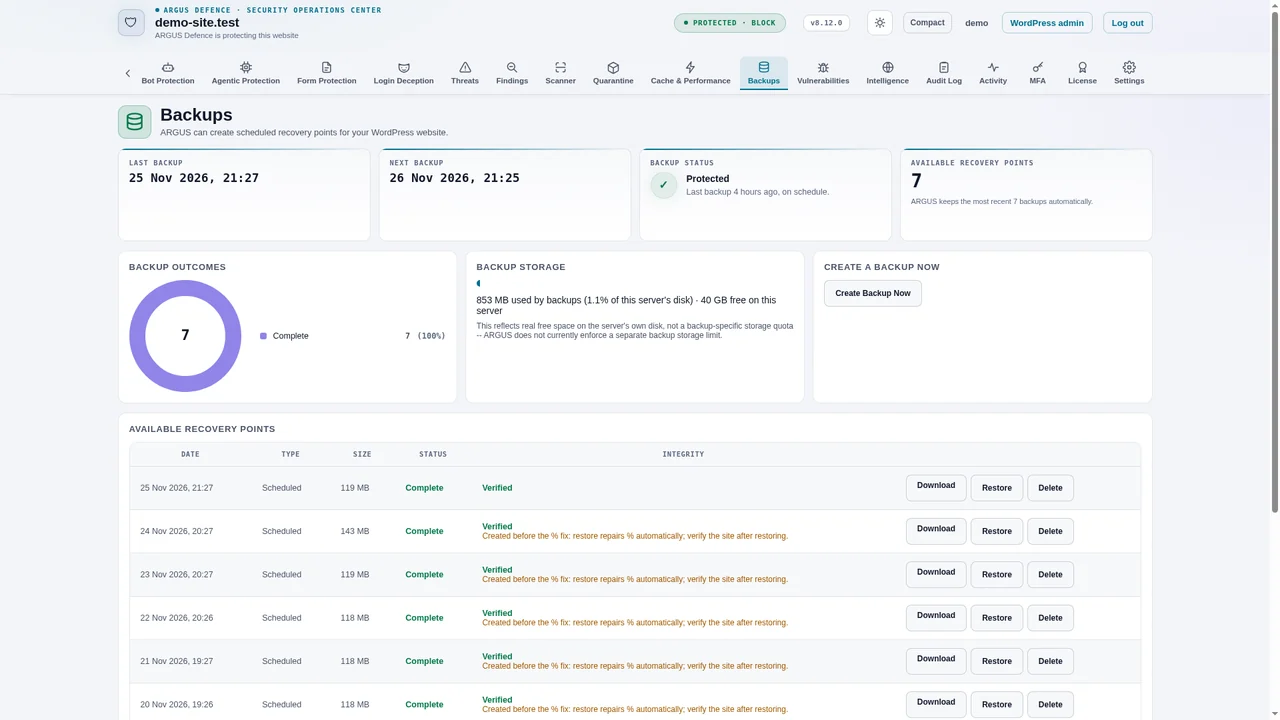
Create verified recovery points of your database and wp-content folder, restore them with an automatic safety copy, and download copies. Backups stay on your server. Scheduled backups are Premium.

Included

  • Your database (this site's tables)
  • The wp-content folder: themes, plugins, uploads, mu-plugins
  • A verification after each backup

Not included

  • WordPress core files and wp-config.php
  • Off-site or cloud storage
  • Incremental backups or single-file restore
  • Free: create, download, delete, restore everything or only the database. A safety copy of the current state is taken first.
  • Premium: scheduled, unattended backups (every 1, 6, 12 or 24 hours, or every 7 days).
  • Needs the PHP zip extension on your host. Download a copy to keep it somewhere safe.
Argus Defence · Backups
Backups screen with recovery points, status and storage
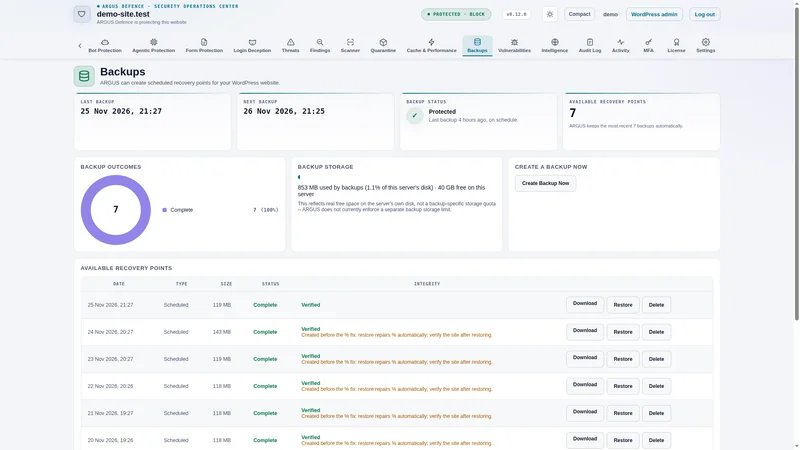
Backups: recovery points, status and storage used. Real console, demonstration site; identifying data replaced.

05 · See and control

Monitor and maintain

Threats

Blocked attacks over time, attack types, offenders and login campaigns. In Monitor mode it also shows what would have been blocked.

Audit log

Security events and administrator actions, including plugin changes and credential changes. Entries are chained, so an edit or deleted row can be detected.

E-mail alerts

Alerts through your own mail setup, with a severity threshold you choose. Critical findings are on by default.

Health self-check

Every five minutes Argus checks that its own files, database, scanner and firewall are healthy, and raises a finding if something is not.

Page cache and performance

An optional page cache with safe exclusions, off until you enable it. Cache warming, minification and compression tuning are Premium.

Dashboard and centralised control

One place inside WordPress for everything above

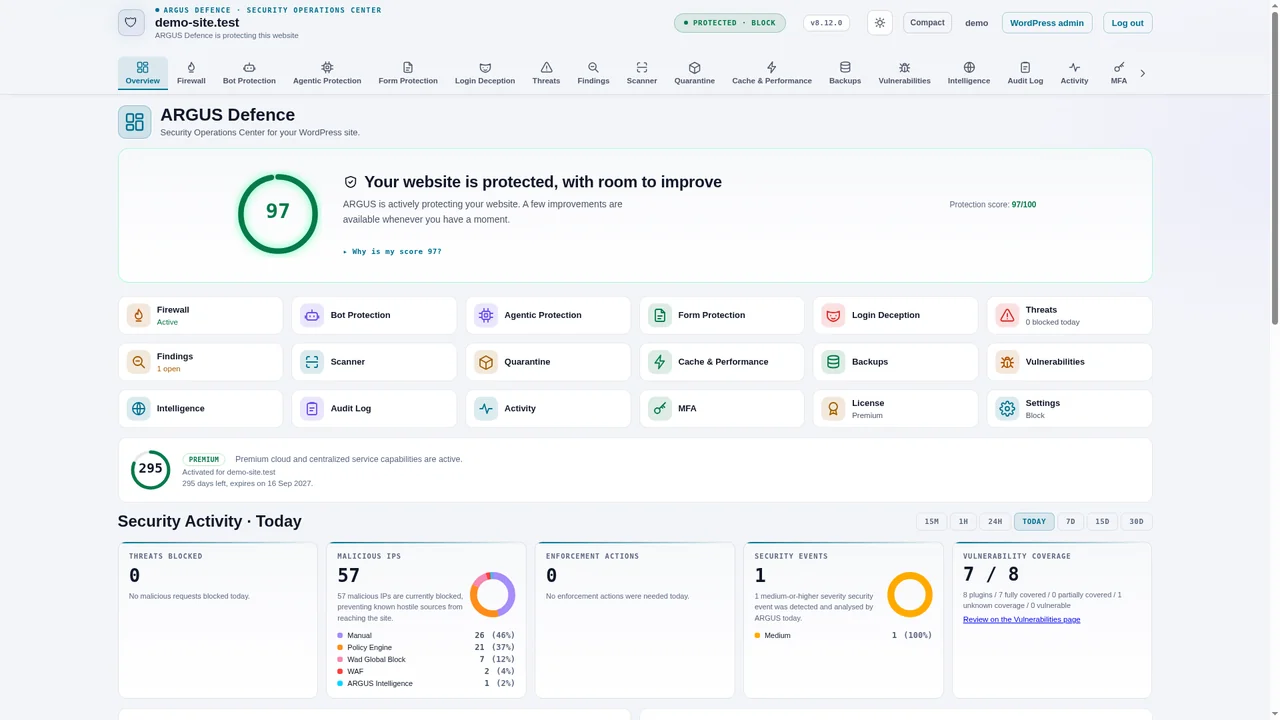
Argus adds a single menu entry to your WordPress admin. Every module shares the same console, the same findings and the same audit log, with a light and dark theme and a phone layout.

  • Overview
  • Threats
  • Findings
  • Scanner
  • Quarantine
  • Vulnerabilities
  • Firewall
  • Bot Protection
  • Agentic Protection
  • Form Protection
  • MFA
  • Login Deception
  • Backups
  • Cache & Performance
  • Audit Log
  • Activity
  • Intelligence
  • Settings

Agencies with 7 or more Premium sites can also manage them from the Weboria Agency Dashboard.

Argus Defence · Overview
Overview with protection score, module tiles and today's security activity
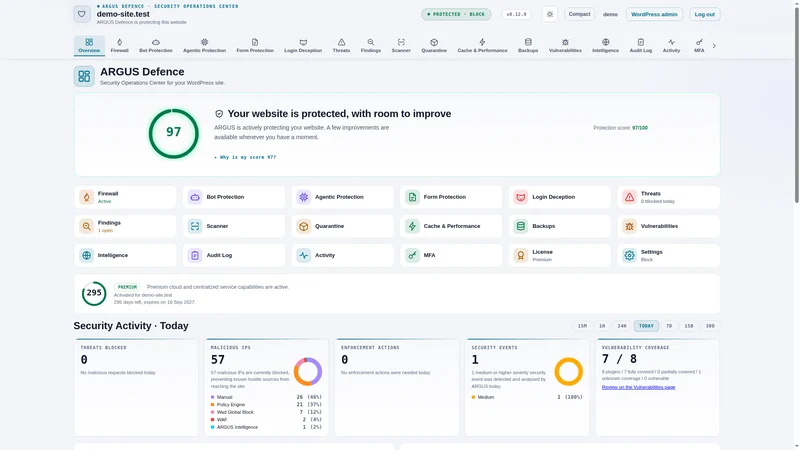
Overview: protection score, modules and today's activity. Real console, demonstration site; identifying data replaced.

06 · Learn from the wider network

Intelligence

Argus network (ANIS)

Premium sites that choose to connect share blocked-IP data and receive reputation, firewall rule and vulnerability updates. The connection is a switch you turn on. Free never connects.

Agency dashboard

For agencies with 7 or more Premium sites: status, findings, bans and queued actions such as scans and backups for every connected site in one place.

See how the Argus network works

Compare editions

Verified against the plugin's code for the current release.

Free and Premium editions compared
CapabilityFreePremium
Included in both editions
Firewall (Monitor mode by default), bans and IP managementIncludedIncluded
Exploit-specific firewall rules and the REST batch guardIncludedIncluded
Form protection and registration review, for the supported formsIncludedIncluded
Bot Protection and Agentic Protection (Bot Protection is off until you enable it; Agentic Protection starts in Shadow)IncludedIncluded
Login protection, two-factor authentication, custom login URL and Login Deception (the last two are off until you enable them)IncludedIncluded
Malware scanner, file integrity monitoring and findings: a daily full scan, Quick and Full scans on demandIncludedIncluded
Quarantine and the uploads PHP lockIncludedIncluded
Vulnerability list with the signed offline baselineIncludedIncluded
Threats, audit log, activity, e-mail alerts and health checkIncludedIncluded
Manual backups, download and restore with a safety copyIncludedIncluded
Automatic updates (on by default)IncludedIncluded
Where Premium goes further
Scan schedulesUp to 3 (daily, weekly or monthly)Up to 10, including intervals from 1 to 168 hours
BackupsManual, on demandPlus scheduled backups
Vulnerability intelligenceSigned offline baseline (public NVD records, partial coverage, updated with each release)Plus a live vulnerability feed from the Argus network (ANIS)
Virtual patchingNot includedVersion-gated virtual patches for specific known plugin vulnerabilities, delivered by ANIS
IP reputation and live firewall rulesNot includedFrom ANIS, once you connect your site
Page cacheOptional; discovery and compressionPlus cache warming, minification and compression tuning
Intelligence pageNot includedConnection state, last sync and ANIS-sourced activity
Weboria Agency DashboardNot includedAgencies with 7 or more Premium sites

Local protection never depends on licence state: if a Premium licence lapses, the site returns to Free and keeps its firewall, scanner, quarantine and local data. Features marked as off until enabled are available in both editions but you switch them on.

Get started

Protect your WordPress site today.

Start with the Free edition, upgrade to Premium when you want intelligence and automation. Your protection never pauses in between.